

classroam wall travelAp Logo

Track and Monitor Every Student’s Educational Journey in Real Time

A smart digital platform by EdTerra that keeps schools, teachers, coordinators, principals, and parents connected throughout every student journey.


app.edterra.com/school-admin/dashboard

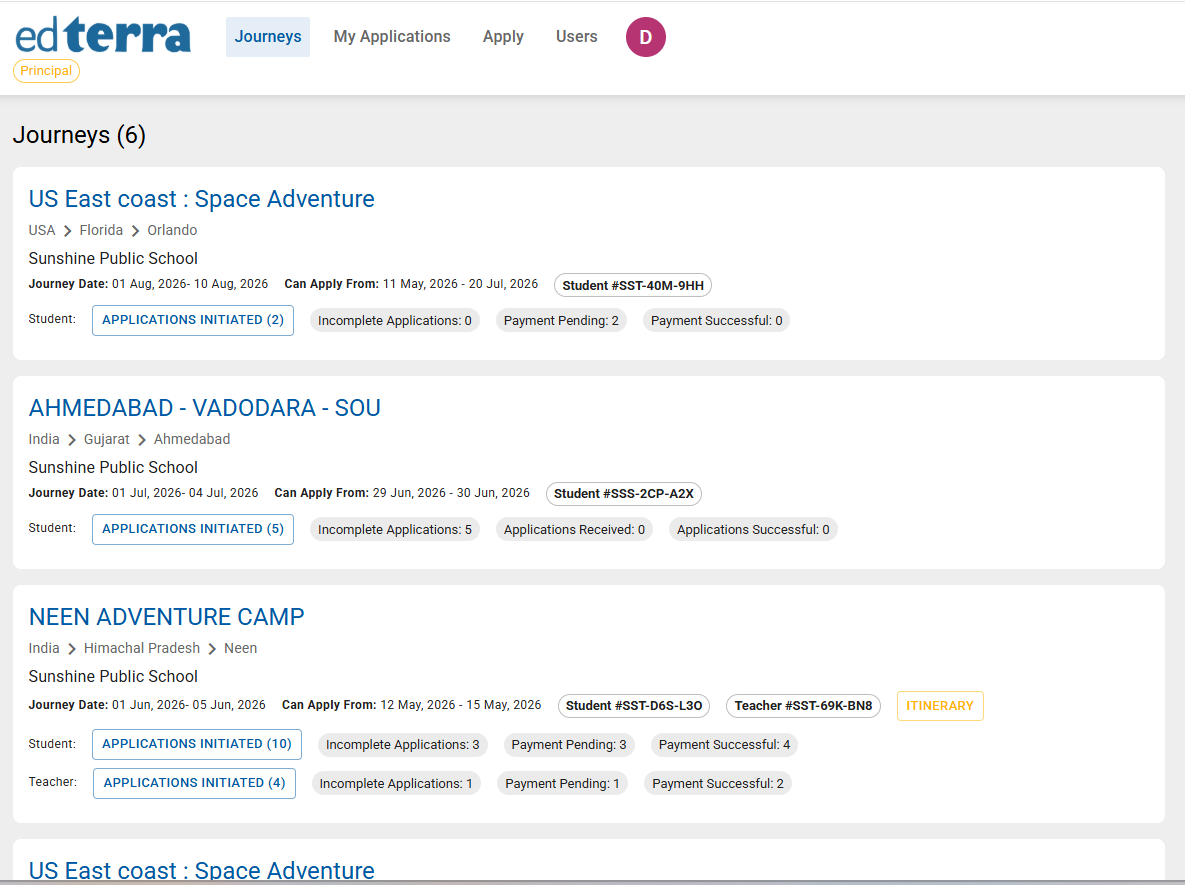
School dashboard with journeys, application counts and payment status

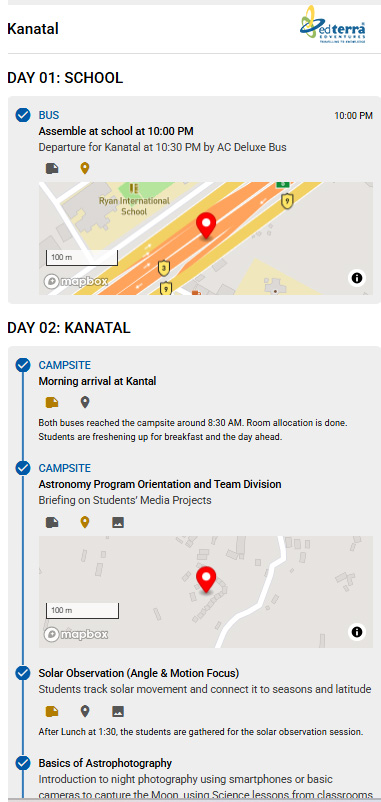
Parent app day-wise journey timeline
GPS check-inDeparted school
Arrived at campsite · 8:30 AM


About TravelAp

Track every journey, every student, in real time.

TravelAp empowers parents, school principals, and school coordinators with one connected digital platform for every EdTerra student journey. From registration to journey updates, it brings every important travel touchpoint into one place.

Parents can stay closer to their child’s journey through day-by-day itinerary movement, GPS check-ins, journey images, and notes shared during the program. Schools can monitor student registrations, payment status, documents, itinerary movement, and real-time journey updates with clarity and confidence.
TravelAp
13,000+ parents already trust TravelAp – India’s leading student educational travel technology platform

TravelApOne connected platform

Parents
Stay close to their child’s journey

Teachers
Register for upcoming journey programs

School Coordinators
Manage Student Registrations Digitally

Principals
Track Journeys with Confidence

School Management
Oversee Every Journey Clearly
Product Showcase

Everything schools and parents need to stay connected

For Parents

Real-Time Journey Tracking

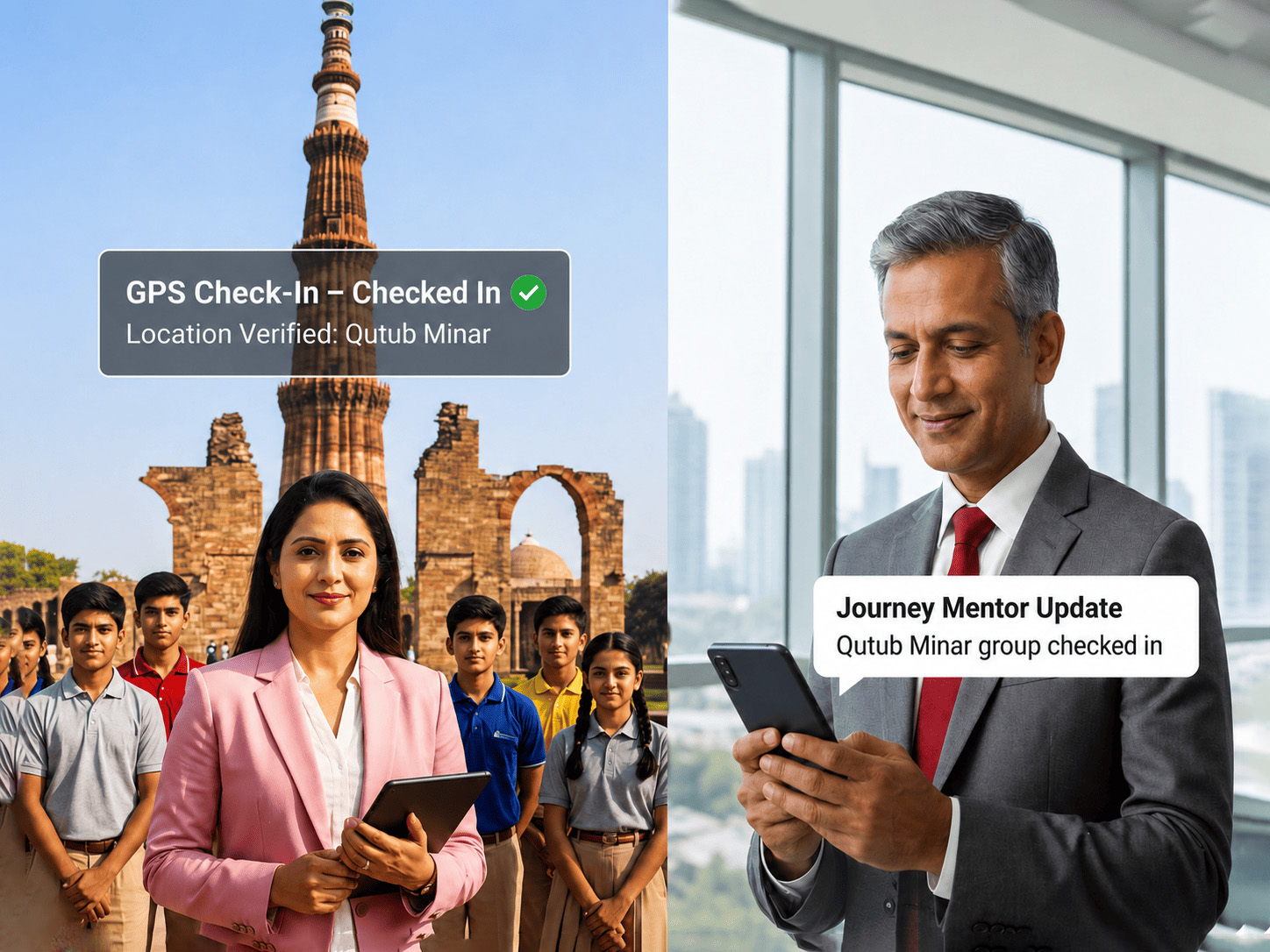
Parents can follow their child’s journey through day-wise itinerary updates, GPS check-ins, and live movement shared by the journey mentor.

Live Journey Updates
GPS check-ins
Day Wise Itinerary

For Parents

Journey Images & Notes

Share journey images, activity updates, and important notes so parents can stay connected to the child’s travel experience.

Journey photos
Activity notes
Daily updates


app.edterra.com/school-admin/journey

For School Coordinators

School Coordinator Dashboard

School coordinators can manage student applications, monitor payment status, upload or download records, access student credentials, and track journey-related details from one dashboard.

Student List Upload
Document Management
Application Tracking
For School Principals

Principal Dashboard

The Principal Dashboard gives Principals a consolidated view of all EdTerra journeys linked with their school. Principals can monitor upcoming programs, student registrations, payment progress, itinerary details, and real-time GPS check-ins from one place.

Journey Overview
Registration Monitoring
GPS Check-ins

app.edterra.com/school-admin/dashboard

Key Benefits

A Smarter Way to Manage Every Student Journey

GPS Check-ins

GPS check-ins help parents and schools stay updated when key itinerary points are reached during the journey.

Journey Timeline

View itinerary movement, activity updates, and check-ins in a clear timeline format.

Journey Images & Notes

Parents can view journey photos and notes shared during the program to feel closer to their child’s travel experience.

Student Registration

Parents and teachers can complete journey registrations digitally, reducing paperwork and improving accuracy.

Payment & Application Status

Schools can track application status, pending payments, and successful submissions in one place.

School Dashboards

Coordinators and principals can manage student records, documents, itinerary details, GPS check-ins, images, and notes.

How It Works

How TravelAp Keeps Every Student Journey Connected

1

Journey is published

The upcoming EdTerra journey is added to TravelAp with important program details and timelines.

2

Registrations are completed

Parents or teachers complete the required journey application digitally, reducing paperwork and manual follow-ups.

3

School teams manage records

Coordinators upload student lists, submit documents, and monitor application and payment status from the dashboard.

4

Live updates are shared

Journey mentors share GPS check-ins, itinerary movement, images, and notes during the program.

5

Parents and schools stay informed

Parents, principals, coordinators, and school teams can follow important journey updates with clarity and confidence.

Helper Videos

TravelAp Helper Videos

Quick step-by-step guides to help parents, teachers, coordinators, and school management use TravelAp with ease.

Parents
Available

How to Register your Child for a Domestic Journey

A step-by-step guide for parents to complete their child’s domestic journey application on TravelAp, including sign-up, child profile creation, journey application, payment details, and final submission.

Teachers
Available

How Teachers Can Register for an International Journey on TravelAp

A step-by-step guide for teachers to complete their international journey registration on TravelAp, including sign-up, starting a new journey application, and completing sections.

School Coordinator
Available

Adding Student Travellers via the Coordinator Dashboard

A step-by-step guide for school coordinators to upload the travelling student list and required student documents through the TravelAp dashboard.

International journey registration guide thumbnail

Parents

How to Register your Child for an International Journey

A step-by-step guide for parents to complete their child’s international journey application on TravelAp. The process covers international journey variants.

Coming Soon · Video work in progress

International journey registration guide thumbnail

School Principal

School Principal Dashboard

A quick guide for school principals and management teams to understand how to use the dashboard to view upcoming journeys, monitor student registrations, track payment status, access itinerary details, and follow real-time GPS check-ins.

Coming Soon · Video work in progress

FAQs

Frequently Asked Questions

Find answers to common questions about TravelAp, journey registration, real-time tracking, and school dashboard access.
TravelAp is EdTerra’s digital platform that helps parents, schools, teachers, coordinators, and principals manage and monitor student educational journeys. It brings journey registration, updates, GPS check-ins, images, notes, and dashboard visibility into one connected platform.


TravelAp is designed for parents, teachers, school coordinators, school principals, and school management teams associated with EdTerra journeys. Each user gets access to relevant features based on their role.


Sign up and log in as a parent, add your child’s profile, start a new journey application, then upload your payment details and submit — no paperwork required. Helper videos walk you through both domestic and international registrations.


Parents can track and monitor their child’s educational journey in real time. They can view day-wise itinerary movement, GPS check-ins, journey images, notes, application status, and important updates shared during the program.


The journey mentor performs GPS check-ins at each point on the itinerary, so you can see the group’s real-time movement along the planned route.


Journey mentors upload images and notes during the program, and you can view them live in the app alongside the day-by-day itinerary.


Log in to the coordinator dashboard, upload the travelling student list for the upcoming journey, and submit the required student documents in bulk — no physical forms needed.


Yes. School coordinators can upload travelling student lists digitally through the TravelAp dashboard, reducing the need for physical forms and manual paperwork.


Principals can view upcoming EdTerra journeys linked with their school, monitor student registrations, check payment status, access itinerary details, and track real-time journey movement through GPS check-ins.


Users can refer to the helper videos available on this page. For further assistance, they can contact the EdTerra team.


TravelAp, Built for the journey

One connected platform for parents, teachers, coordinators, and principals — by EdTerra.

TravelAp school dashboard
TravelAp parent app